Hytale Update 2 Character Creator Changes
See every Hytale Update 2 avatar creator change that affects character builds: masks, blindfolds, haircuts, white cloth, armor visibility, and color names.
Hytale Update 2 is useful to character builders because it changed the parts of the avatar creator that affect finished recipes: face framing, haircut reliability, color labels, and armor visibility. The official Update 2 patch notes were published on January 24, 2026, and the important builder lines are easy to miss if you read them as ordinary patch-note trivia.
Source check: This page was rechecked against the official patch notes on August 31, 2026. It is scoped to Update 2, not later Hytale cosmetic releases. For the current release line, continue to the Update 6 character customization changes, reviewed against version 0.6.2.
This site is a fan-made recipe archive, not an official Hytale resource and not an import/export tool. When we read an update, the question is narrower than "what changed in the game?" The useful question is: which changes make a manual recreation easier to verify, screenshot, explain, or revise?
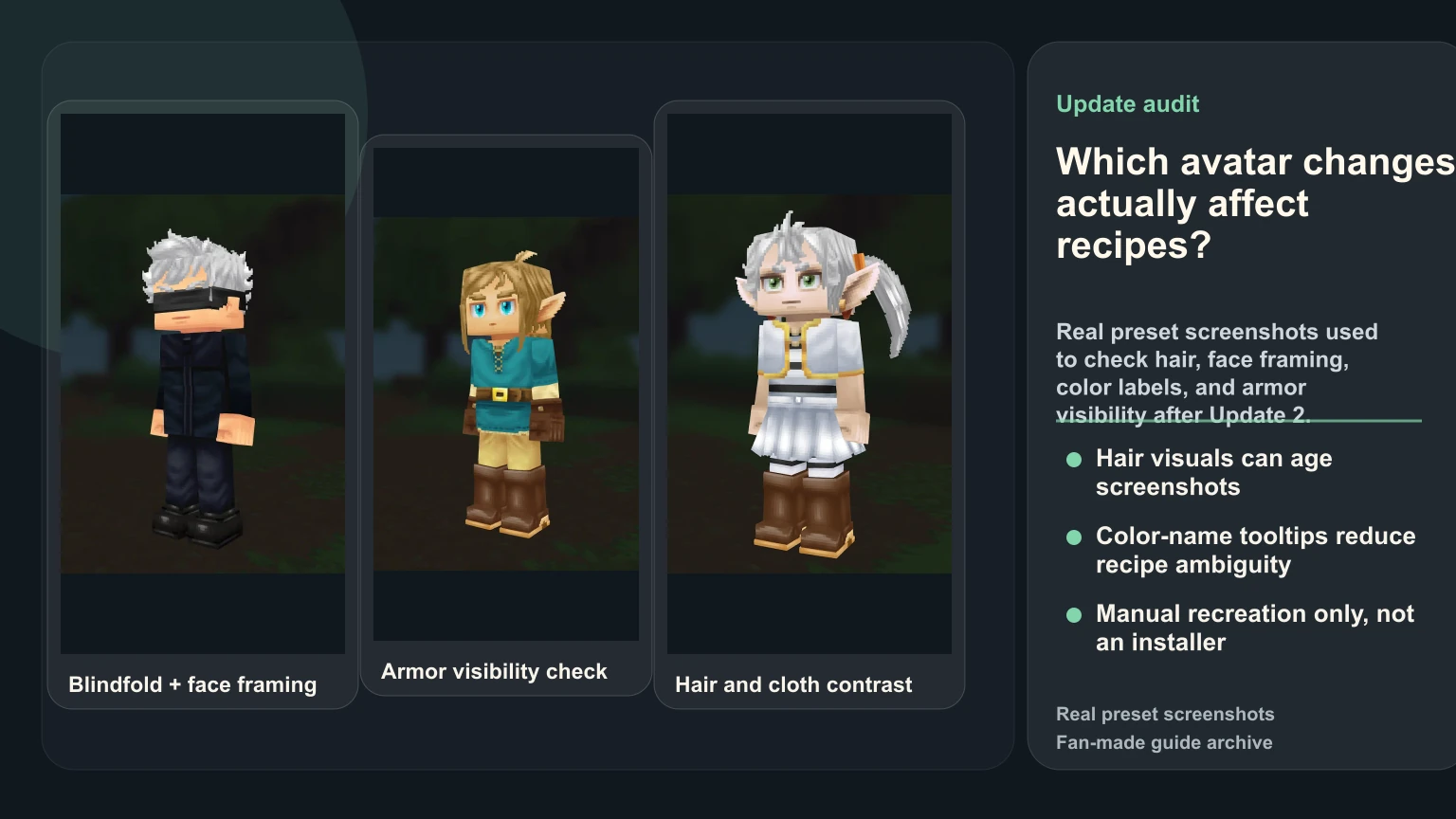
Every Update 2 avatar change that affects recipes
| Official change | What it changes for a character build | Recipe to recheck |
|---|---|---|
| Bandit Mask, Blindfold, Bandage Blindfold, and new mouth options | Face-led characters can replace weaker approximations with a closer creator option. | Gojo Satoru |
| Visual updates to six named haircuts | A stored choice may be unchanged while the current silhouette and old screenshot no longer match. | Hatsune Miku |
| White added to fantasy cotton cosmetic colors | Pale robes and capes can use a cleaner light separator, but still need contrast testing. | Frieren |
| Armor-slot visibility toggles | Authors can capture a clearer costume screenshot, subject to the server host's visibility rules. | Link |
| Color names shown in Avatar Customization tooltips | Written recipes can identify close swatches more clearly and reduce guesswork. | Astolfo |
| Improved cape animation while running | Cape-led recreations should be checked in motion as well as in a neutral screenshot. | Astolfo |
The short version for recipe authors
If you maintain a preset after Update 2, check these areas first:
- Builds that used a blindfold, mask, bandage, or strong face accessory.
- Builds whose hair choice was a compromise because the old visual read was weak.
- White or near-white fantasy cloth choices that used beige or gray as a fallback.
- Screenshots where visible armor made the costume harder to read.
- Recipes where a color name was vague or hard for players to find in the creator.
That is not a call to rewrite every page. It is a targeted review queue. A good archive updates the presets that actually changed, then leaves stable pages alone.
New face options can rescue "almost there" builds
Update 2 added several avatar options, including mask, blindfold, bandage blindfold, and mouth variants. For a recipe archive, the most valuable part is not novelty. It is the ability to replace weak approximations.
Some characters fail in Hytale because the whole creator lacks a matching structure. Others fail because one face-framing piece is missing. Gojo-style recreations are a good example: the difference between a generic dark face band and a readable blindfold is not cosmetic trivia. It changes whether the screenshot communicates the character before the title does.
When revisiting a face-led preset, use this test:
- Open the old screenshot beside the current creator.
- Swap only the face accessory or mouth option.
- Keep hair, torso, and palette unchanged.
- Capture a neutral screenshot.
- Decide whether the new option improves recognition at thumbnail size.
If the answer is yes, update the recipe notes. If the answer is only visible when zoomed in, keep the old version and mention the new option as a tweak.
Hair visual updates can make old screenshots stale
Update 2 updated visuals for several haircuts, including Single Side Pigtail, Hair Stick Bun, Simple Bobcut, Fighter Buns, Smart Elven, and Windswept. Hair is structural in Hytale. It is often the first thing a player reads at medium distance.
That means a haircut update can affect a page even when the stored recipe JSON still points to the same option. The JSON did not break, but the screenshot may no longer be the best evidence.
For published presets, check hair changes in this order:
- Does the current option still carry the character's silhouette?
- Did the visual update make the option stronger than a previous fallback?
- Does the old screenshot now understate the quality of the build?
- Would a new screenshot make the manual recipe easier to trust?
Do not treat every haircut update as an automatic win. A changed asset can also make a match worse. The archive should say what changed and why the selected option still works.
White fantasy cotton matters because separators matter
The patch added white to fantasy cotton cosmetic colors. That sounds small until you build robe, tunic, cloak, and mage recipes.
White cloth often acts as a separator color. It can make trim clearer, stop a pale outfit from turning muddy, and help a white-haired character keep enough contrast between face, torso, and boots. In a preset like Frieren, the difference between "close enough gray" and a cleaner light cloth read can affect the whole screenshot.
When testing a white cloth update, do not compare the swatch in isolation. Compare the finished build:
- Does the face still have enough value contrast?
- Does the torso look cleaner or flatter?
- Does the white area steal attention from the hair?
- Does the screenshot read better on the blog/category card?
If the white option improves the finished read, update the page. If it makes the character look too flat, keep the older compromise and explain why.
Armor visibility toggles help screenshot honesty
Update 2 added armor slot visibility toggles in the character panel, with server-host control for enforcement. For recipe authors, the main benefit is clean screenshot review.
The screenshot should show the recipe you are asking players to rebuild. If armor covers the costume layer, readers cannot tell whether the preset works. If armor is hidden without explanation, readers may assume the page is promising a gameplay state that is not always available.
The safe pattern is:
- Use clean screenshots for recipe evidence.
- Say when a look depends on hidden armor visibility.
- Keep the creator path focused on manually selected avatar pieces.
- Avoid implying that a page installs or equips anything automatically.
That distinction matters to players who want a result they can actually reproduce. A useful guide explains the limitation instead of hiding it.
Color-name tooltips make recipes easier to follow
The same Update 2 notes say color tooltips now display names when hovering over color options in Avatar Customization. This is one of the most practical documentation changes in the patch.
Screenshots are not enough for a manual recreation archive. A reader needs to find the same creator option without guessing which nearby swatch you meant. Color names reduce ambiguity, especially for skin tone, hair tone, and cloth accents where two options can look close in a compressed screenshot.
When revising a recipe after Update 2, use the tooltip names in the notes where they reduce confusion. Do not stuff every color name into a paragraph. Add them where a player would otherwise have to guess.
What Update 2 did not solve
Update 2 did not turn Hytale recipes into direct imports. It did not remove creator tradeoffs, add infinite accessory control, or make every franchise character easy to rebuild. A page still needs source disclosure, screenshot evidence, recipe JSON, creator path, and known limitations.
That is why the best update work is selective. If a preset was weak because the character needs a tiny emblem or actor likeness, Update 2 probably did not solve it. If the preset was weak because a blindfold, cloth color, hair visual, or screenshot state was awkward, it may now deserve a revision.
A practical Update 2 audit checklist
Use this before changing a public preset:
- Confirm the page still answers a clear player need and the current recipe is worth maintaining.
- Compare the old screenshot with the current creator result.
- Check face accessories and mouth options first.
- Recheck hair only if the selected haircut was named in the patch notes or looked weak before.
- Test white fantasy cotton only in the full outfit.
- Capture a clean screenshot with armor visibility handled intentionally.
- Update the written notes only where the patch changed the actual recipe logic.
This is the difference between useful maintenance and generic patch content. The goal is not to mirror Hytale news. The goal is to keep a fan-made manual recipe archive accurate enough that another player can rebuild the character without guessing.
For related workflow context, compare the later Update 6 character customization changes, then read our Hytale character creator mistakes guide, the anime skin tone guide, and the Editorial Policy that defines how this archive reviews recipes.