10 Hytale Character Creator Mistakes That Make Good Presets Look Wrong
Fix the Hytale preset mistakes that most often ruin good recreations: weak silhouette decisions, literal color matching, noisy layering, and screenshot-driven misreads.
When a Hytale preset looks wrong, the problem is usually not one missing cosmetic. It is usually the build order. Builders tune facial detail before the silhouette works, copy reference colors too literally, stack every close option, or publish settings without explaining why the recipe should be trusted.
This guide is a repair checklist for fan-made Hytale character recipes. It assumes the same boundary as the rest of this archive: no official affiliation, no import/export promise, no one-click install, and no file replacement. The goal is to help a player manually rebuild a better character using screenshot evidence, recipe JSON, creator path, and honest limitations.
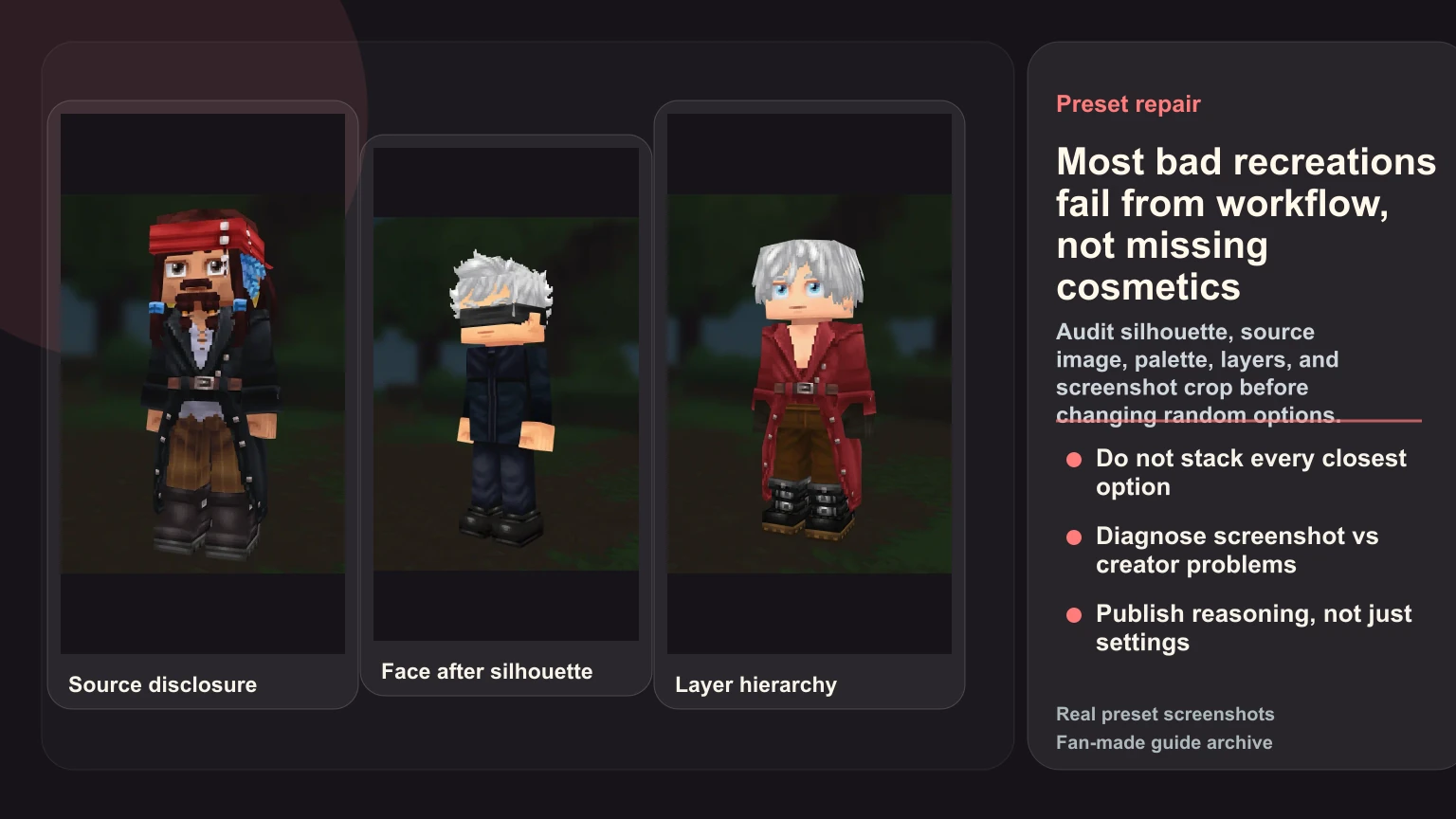
Mistake 1: Starting with the face before the silhouette
Face options feel important because they are easy to stare at in the creator. But players do not read a preset at nose distance. They read hair mass, outfit shape, role, and color rhythm first.
Fix it:
- Hide tiny details mentally.
- Ask whether the character is recognizable as a silhouette.
- Lock hair and torso before mouth, eye, or accessory tweaks.
- Review the build from medium distance.
Gojo-style builds are the exception that proves the rule. The blindfold matters, but it only works because hair and dark outfit support it. A face accessory alone cannot rescue a weak body read.
Mistake 2: Using the wrong source image
A bad reference creates bad decisions. Dramatic fan art, extreme lighting, or mixed-version collages can push a builder toward impossible targets.
Use one main source reference for the first pass. It should show:
- the version of the character you are rebuilding,
- stable hair and outfit information,
- readable color relationships,
- enough front or three-quarter information to judge silhouette.
Use secondary references only to confirm details. If every decision requires a different image, the build will drift.
For public recipes, source disclosure matters. A reader should understand whether the page is recreating a game model, anime version, movie costume, or general archetype.
Mistake 3: Treating hair as decoration
Hair is often the main identity carrier in Hytale. It affects silhouette, face framing, color contrast, and mood.
Bad habit:
- pick a generic close haircut,
- tune the face for too long,
- hope the outfit fixes the read.
Better habit:
- choose two or three hair candidates,
- test them with the torso block visible,
- keep the one that reads best at screenshot scale.
If the hair is wrong, the recipe will usually keep feeling wrong no matter how many smaller options you adjust.
Mistake 4: Copying colors literally
Reference colors are not game colors. Anime frames, movie stills, and game key art all carry lighting and style choices that may not translate directly into Hytale.
Fix it by judging relationships:
- skin tone beside hair,
- torso contrast beside legs,
- accent color beside the main costume block,
- screenshot value at thumbnail size.
If the color feels off, do not ask "which swatch is exact?" Ask "which relationship is failing?" Our anime skin tone guide covers this in detail.
Mistake 5: Letting layers fight each other
Many presets contain several individually reasonable choices that do not work together. The jacket is too heavy for the legs. The scarf fights the hair. The boots pull attention away from the coat. The face accessory covers the one feature that should stay visible.
Pick the main identity layer:
- coat,
- cloak,
- tunic,
- uniform jacket,
- hat,
- hair.
Then make every other layer support it. If a detail is accurate but makes the main layer harder to read, cut it or move it into the known limitations.
Mistake 6: Solving screenshot problems as creator problems
Sometimes the build is weak. Sometimes the screenshot is weak. Do not confuse them.
Signs of a screenshot problem:
- one crop makes the preset look bad but a neutral angle looks fine,
- the background competes with the outfit,
- lighting makes the face flatter than it is,
- the character is too small on the card.
Signs of a creator problem:
- the silhouette fails in every angle,
- the hair and outfit disagree,
- the palette is noisy in neutral light,
- the page only works if the title explains the character.
Fix the screenshot when the build is sound. Fix the recipe when the build fails in a plain view.
Mistake 7: Stacking every closest option
Hytale recreations require compromise. The mistake is including every compromise at once.
A crowded preset often has:
- the closest hat,
- the closest glasses,
- the closest scarf,
- the closest trim,
- the closest secondary color,
- and no clear hierarchy.
The result is busy, not accurate. Use this order instead:
- Preserve silhouette.
- Preserve the main costume block.
- Preserve hair or face framing.
- Preserve color rhythm.
- Add small details only if they improve the read.
If a detail is accurate but noisy, leave it out and disclose the limitation.
Mistake 8: Judging only at creator zoom
The creator view encourages over-inspection. A tiny facial tweak may look important at close range and disappear in a real screenshot. A broad color mistake may be invisible close up and obvious on a blog card.
Every serious recipe needs two tests:
- close view for obvious option errors,
- card-size screenshot for actual recognition.
If the preset only works when you are zoomed in and mentally filling the gaps, it is not ready.
Mistake 9: Publishing settings without reasoning
A settings list tells the player what was selected. It does not tell them why the build works or what to preserve when Hytale changes.
A useful recipe note should answer:
- What carries the character first?
- Which creator limitation is still visible?
- Which alternative option might be worth testing?
- What should a player not over-adjust?
- When was the page last reviewed or updated?
This is what separates a guide archive from a screenshot dump. It also makes the page more resilient if option names, colors, or cosmetics change later.
Mistake 10: Forgetting that Hytale is a translation
A Hytale recreation is not the source character copied into the game. It is a translation into Hytale's visual language.
That means a good page should be honest:
- fan-made,
- manual recreation only,
- source rights belong to their owners,
- screenshot evidence comes from the preset,
- recipe JSON is supporting data,
- known limitations are part of the review.
If a page cannot say those things clearly, it is not ready to help another player recreate the look without guessing.
A fast repair process
When a preset feels wrong, do this before changing random options:
- Capture a plain front or three-quarter screenshot.
- Shrink it to card size.
- Name the first failing layer: silhouette, hair, torso, face, palette, or screenshot.
- Change only that layer.
- Retake the screenshot.
- Write one sentence explaining the tradeoff.
This process is slower than clicking through options, but it produces better recipes. It also produces better public pages because the reasoning is visible to the next player.
Examples to study
Use real pages, not abstract rules:
- Jack Sparrow for source disclosure and costume limitation notes.
- Gojo Satoru for face framing after silhouette.
- Dante for coat hierarchy and known limitations.
- Link for beginner-friendly role silhouette.
- Frieren for restrained color and hair balance.
Then read how to recreate characters in Hytale, best first characters to recreate, and the Submission Guidelines. A good submission is not just a nicer screenshot. It is a recipe another player can manually rebuild and understand.