Hytale Character Creator Guide: How to Make Skins and Avatars
Use the Hytale character creator to make skins and avatars by hand. Learn the maker and editor workflow for hair, face, outfit, colors, and screenshots.
To make a recognizable Hytale character, choose one reference image, build the hair and outfit silhouette first, match colors in the finished avatar, and refine the face last. This guide turns that process into a repeatable creator workflow for anime, game, and movie characters.
HytaleCharacter.com is a fan-made recipe archive. It is not an official Hytale skin maker, a live character editor, or a source of downloadable skin files. The pages here document manual choices you can reproduce in Hytale's Avatar Creator.
Hytale character creator, skin maker, or skin editor?
Players use several terms for the same goal, but they can imply different tools. This guide covers the in-game avatar workflow and makes the boundary clear.
| Search term | What players usually mean | What this guide provides |
|---|---|---|
| Hytale character creator | The in-game Avatar Creator used to choose appearance options. | A repeatable order for selecting hair, face, clothing, and colors. |
| Hytale skin maker | A way to design a recognizable player appearance. | Manual character recipes and examples, not a browser-based maker or export tool. |
| Hytale skin editor | A place to adjust an existing look. | A revision method for comparing silhouettes, palettes, and creator choices. |
| Hytale character model | The finished avatar or, in modding contexts, a custom 3D asset. | Player-avatar guidance only; this article does not teach 3D modeling. |
The official Hytale Update 2 notes call the menu Avatar Customization, while the July 2026 Chapter 1 preview calls the tool the Avatar Creator. Searchers often call the result a skin, so this guide uses both terms while keeping the workflow accurate.
Current version check: This workflow was reviewed on August 31, 2026 against the final Update 6 release line and version 0.6.2. Update 6 adjusted every haircut, ear-accessory alignment, named cosmetics, and saved-cosmetic repair. Check the Update 6 character customization changes before reusing an older recipe screenshot.
Five-step Hytale skin maker workflow
- Choose one character version and one primary reference image.
- Build the hair, head shape, torso, and legs as a readable silhouette.
- Match skin, hair, and clothing colors inside the finished outfit.
- Add face details and accessories only after the large shapes work.
- Capture a neutral screenshot and compare it at thumbnail size.
The rest of this guide explains each step, the common mistakes, and the real recipe pages you can use as starting points.
Why most Hytale recreations fail before the screenshot stage
The hard part of rebuilding a character in Hytale is rarely the final click. It is the sequence of choices you make before that click. Most failed recreations do not fail because the creator is weak. They fail because the builder has no workflow. They bounce between hair, torso, and color swatches, chase tiny details too early, and end up with a preset that technically uses the right menu options but still does not read like the source character.
That is the gap Hytale Character Recipes is trying to close. We are not just collecting JSON files. We are building a public archive of edited character recipes that explain which choices matter, which ones are flexible, and where Hytale's avatar creator tends to distort a reference. If you want to understand how those public recipe pages are curated, the best starting point is our About page, where we explain the editorial method behind the archive.
This guide is the workflow we keep coming back to when we test a new recreation. It works for anime characters, game protagonists, fantasy NPCs, and movie silhouettes because it starts with the part Hytale communicates best: shape and color rhythm. Once you have those two layers under control, the rest of the preset becomes much easier to tune.
If your presets keep feeling technically correct but visually wrong, read our follow-up guide on the most common Hytale character creator mistakes. It breaks down the failure points we see most often when a build has the right menu choices but the wrong overall read.
Step 1: Choose the right reference, not just the loudest one
When people say they want to recreate a character, they often mean one of three different things:
- The most iconic version of the character.
- A specific story-era outfit.
- A fan-favorite alternate version.
If you do not decide which one you are targeting, you will build a confusing hybrid. A Naruto preset with a late-series face, an early-series jacket, and colors pulled from random artwork will never feel clean. The same problem happens with game characters whose design changes between sequels.
The better approach is simple: pick one readable reference image and treat it as the anchor. That does not mean you ignore every other source. It means you only use secondary references to confirm details after the main silhouette is locked. For most public recipe pages, we prefer the version that most players would instantly recognize. That makes the resulting guide more useful in search, more useful in screenshots, and easier for other fans to improve later with a variation submission.
If you are deciding between Hytale and Minecraft as a recreation platform, our comparison of Hytale's character system and Minecraft's skin system explains why Hytale rewards that “one reference first” approach so much more strongly.
Step 2: Build the silhouette before you chase small details
The single biggest mistake new builders make is trying to perfect facial detail before the body shape is working. In Hytale, players read characters from medium distance first. That means these questions matter more than they think:
- Is the hair mass correct?
- Is the torso layering doing the right visual work?
- Do the pants and shoes hold the intended proportion?
- Does the character look top-heavy, balanced, or too plain?
This is why our public recipes map choices back to HEAD, GENERAL, TORSO, and LEGS instead of pretending every option has equal value. Some options are identity carriers. Some are cleanup choices. You want to identify the identity carriers first.
For many anime recreations, the hair silhouette and jacket contrast are more important than getting the eyebrow shape perfect. For game characters, it is often the chest silhouette and boot treatment. For movie-inspired builds, the broad costume read matters more than tiny face-accessory choices.
Start with the pieces that give you the fastest recognition boost. Once the silhouette is believable, the rest of the page becomes a process of refinement instead of rescue.
Step 3: Use Hytale colors the way the game renders them, not the way the reference still looks
One reason screenshots from the creator often disappoint people is that color swatches are not neutral. A tone that looks correct in a reference sheet may appear too saturated or too flat once it passes through Hytale's rendering, lighting, and surrounding outfit contrast.
That is why we treat color as a relational problem:
- Skin tone should be judged next to the hair and torso, not in isolation.
- Accent colors should be tested against the dominant outfit block.
- Small color mismatches are acceptable if the overall read becomes more accurate.
This matters even more when you are rebuilding stylized anime faces or pale fantasy characters. If you need a deeper breakdown, our article on using Hytale's color space to match anime skin tones explains how we choose between literal color matching and in-game readability.
In practice, the best workflow is to take a screenshot, step away for a minute, and ask one question: “Does this still read like the character without me explaining it?” If the answer is no, adjust contrast before you adjust detail.
Step 4: Read a recipe as a path, not as a shopping list
One of the reasons our detail pages are written as recipes instead of raw dumps is that Hytale's creator is path-dependent. The order in which you visit categories changes what you notice and what you forget. A builder who treats a guide like a flat checklist usually misses why a preset works.
The better mental model is:
- HEAD establishes identity.
- GENERAL stabilizes the face/body read.
- TORSO does most of the costume work.
- LEGS protects proportion and finish.
That sequence keeps you from overfitting details before the core structure is right. It also makes updates easier. If an in-game menu changes or a cosmetic disappears, you know which layer you are trying to preserve.
This is one reason we have started adding editor notes to recipe pages instead of only showing the settings. The settings tell you what was chosen. The notes tell you what should survive if Hytale changes the creator.
Step 5: Expect to make tradeoffs, and make them on purpose
The most useful Hytale recreations are not always the most literal. Sometimes the “closest” face option produces a weaker overall read than a slightly different face paired with better hair and stronger color blocking. Sometimes the source outfit has details Hytale simply cannot express yet. That does not mean the recreation failed. It means you need a ranked list of priorities.
Our usual priority order looks like this:
- Silhouette and role recognition
- Dominant outfit contrast
- Hair and facial framing
- Skin tone balance
- Small accessories and edge details
That ranking keeps you honest. It also helps when you are deciding whether a new community submission should replace an older version or simply exist as a parallel variation. If the new build improves the character read while keeping the source faithful, it is probably worth publishing. If it only swaps tiny details while weakening the silhouette, it is usually better left as a personal edit.
Common mistakes we see in submissions
Because the archive includes community contributions, we review a lot of almost-good builds. The most common issues are predictable:
1. The source is too vague
“Based on fan art” is not enough if the final build combines multiple contradictory looks. You need at least one stable reference.
2. The screenshot hides the problem
A dramatic angle can make a weak build look better than it is. We prefer clean, readable screenshots because they make the recipe easier to trust.
3. The builder solved the wrong layer
If the torso silhouette is wrong, changing eyebrows will not save it.
4. The colors were copied literally
Some reference colors simply do not survive the translation to Hytale. A successful preset is judged in-game, not in a vacuum.
5. The name does not tell people what changed
If you are sharing a variation, label it clearly. “Winter,” “Alt Armor,” “Timeskip,” or “Tournament Outfit” is much more useful than uploading an unexplained duplicate.
When to submit a variation instead of replacing the original
If you changed the hair, palette, or outfit layers because you found a stronger match, do not assume the original guide should vanish. Often the healthier community pattern is to submit a variation and let the editor compare both. That keeps the archive honest and gives other players more than one route to the same character.
Use a variation when:
- the source has multiple valid costume versions,
- a new Hytale cosmetic unlocks a better match,
- your build solves one visible weakness in the published recipe,
- or your screenshot shows a cleaner final read than the existing page.
If you want to do that, use the preset submission flow and include enough context to explain what changed. If you are reporting a source issue, broken image, or legal concern instead, the faster path is the contact page.
The archive matters more when the creator changes
Hytale is still the kind of game where creator systems, cosmetic labels, and player expectations can shift over time. That makes public recipe pages more valuable, not less. A good archive does not freeze one perfect answer. It preserves the reasoning behind a good answer so the community can keep iterating.
That is the reason we do not treat this site as a dump of “cool presets.” We treat it as an editorial layer over a living creator system. The more clearly a recipe explains its silhouette, palette, and tradeoffs, the more resilient it becomes when the game changes.
If you want to start building right now, the fastest next step is to browse the preset gallery, open a guide that already has a strong screenshot match, and follow the creator path exactly once before improvising. If you already have a better version, send it in. The archive gets better every time someone moves a recipe from “technically similar” to “immediately recognizable.”
Character recipes to open in the Hytale editor
Use these pages as practical creator exercises:
- Gojo Satoru for white hair, blindfold, and a simple dark outfit.
- Frieren for elf ears, pale hair, green eyes, and restrained robe colors.
- Hatsune Miku for twin-tail silhouette and teal outfit accents.
- Astolfo for pink hair, cape, skirt, stockings, and boots.
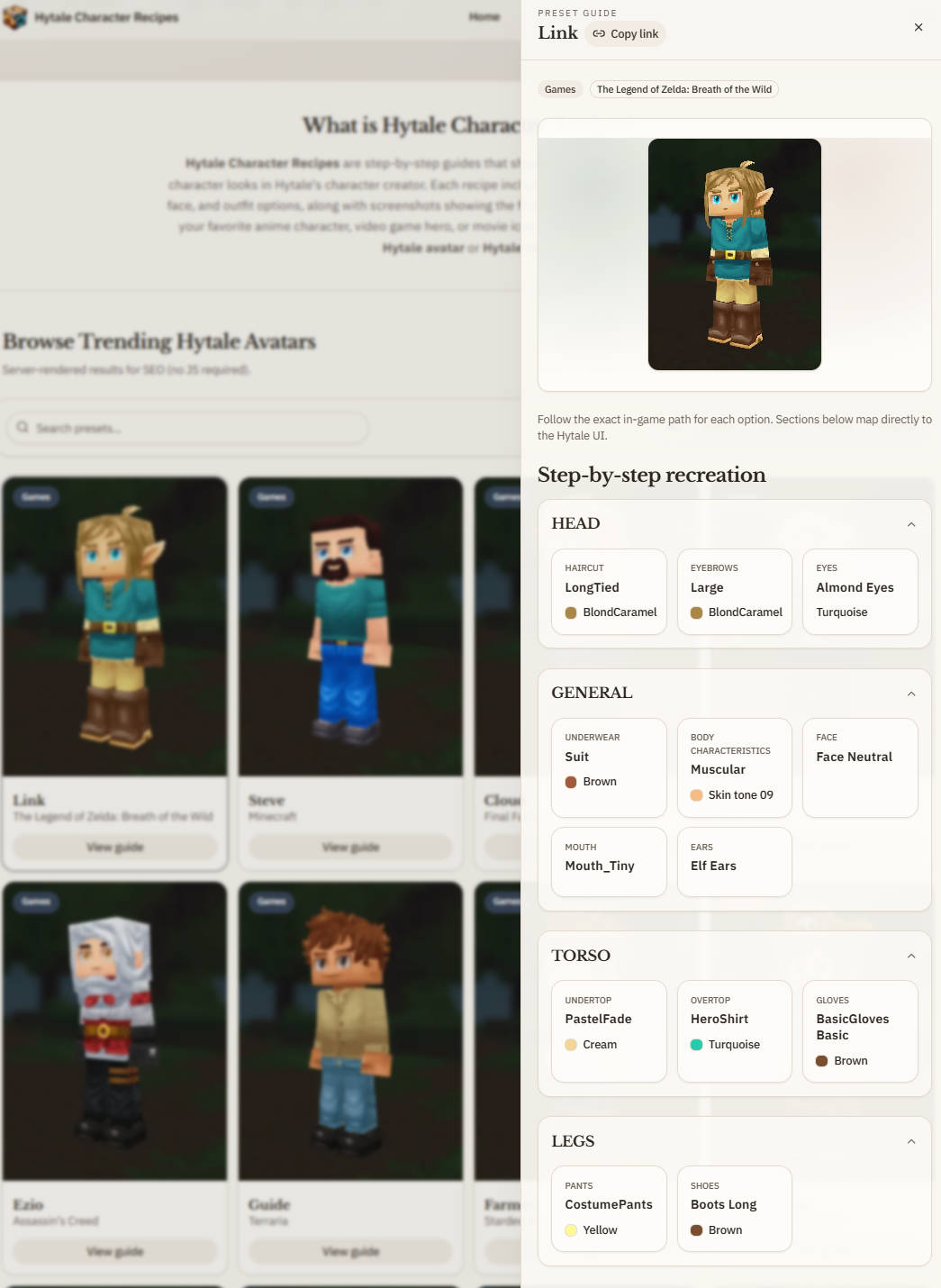
- Link for a beginner-friendly fantasy tunic and boot silhouette.
For a broader shortlist with direct links, see the 12 best Hytale skins and character recipes. Follow one recipe exactly before treating the creator like an editor and changing individual layers; otherwise you lose the baseline that tells you whether the revision is actually better.