How to Match Anime Skin Tones in Hytale: A Color-Space Guide for Better Character Recipes
Learn how to use Hytale's color space to rebuild anime skin tones more accurately, with practical advice on contrast, undertones, and in-game screenshot testing.
Anime skin tone matching in Hytale is not a paint-dropper task. It is a translation task. You are taking a reference made for a drawing, anime frame, manga panel, or promotional image and rebuilding the read inside Hytale's avatar creator, where hair, clothing, lighting, and camera distance all change how the face looks.
This matters because this archive is built for manual recreation. We do not provide an official Hytale import, export, one-click install, or file replacement. A recipe is useful only if a player can open the creator, follow the path, compare the screenshot, and understand the tradeoff.
Start with the finished read, not the reference pixel
The biggest mistake is treating one reference image as a neutral source. Anime references are not neutral. A character can look pale in one scene, warmer in a poster, cooler in a night shot, and flatter in a manga panel.
The better target is the finished read:
- Does the character usually feel pale, warm, neutral, cool, sunlit, muted, or high-contrast?
- Does the face need to stand apart from dark hair or blend gently into light hair?
- Does the outfit push the skin tone warmer or cooler?
- Does the preset still read correctly from a blog card thumbnail?
Those questions are more useful than "which swatch is closest?" A swatch can be close by itself and wrong once the hair and torso are visible.
Use value, temperature, and saturation
When a face looks wrong, diagnose it in three parts.
Value
Value means how light or dark the face reads. It is usually the first thing to fix. A face that is too light can disappear beside white hair or bright cloth. A face that is too dark can make a soft character feel heavier than intended.
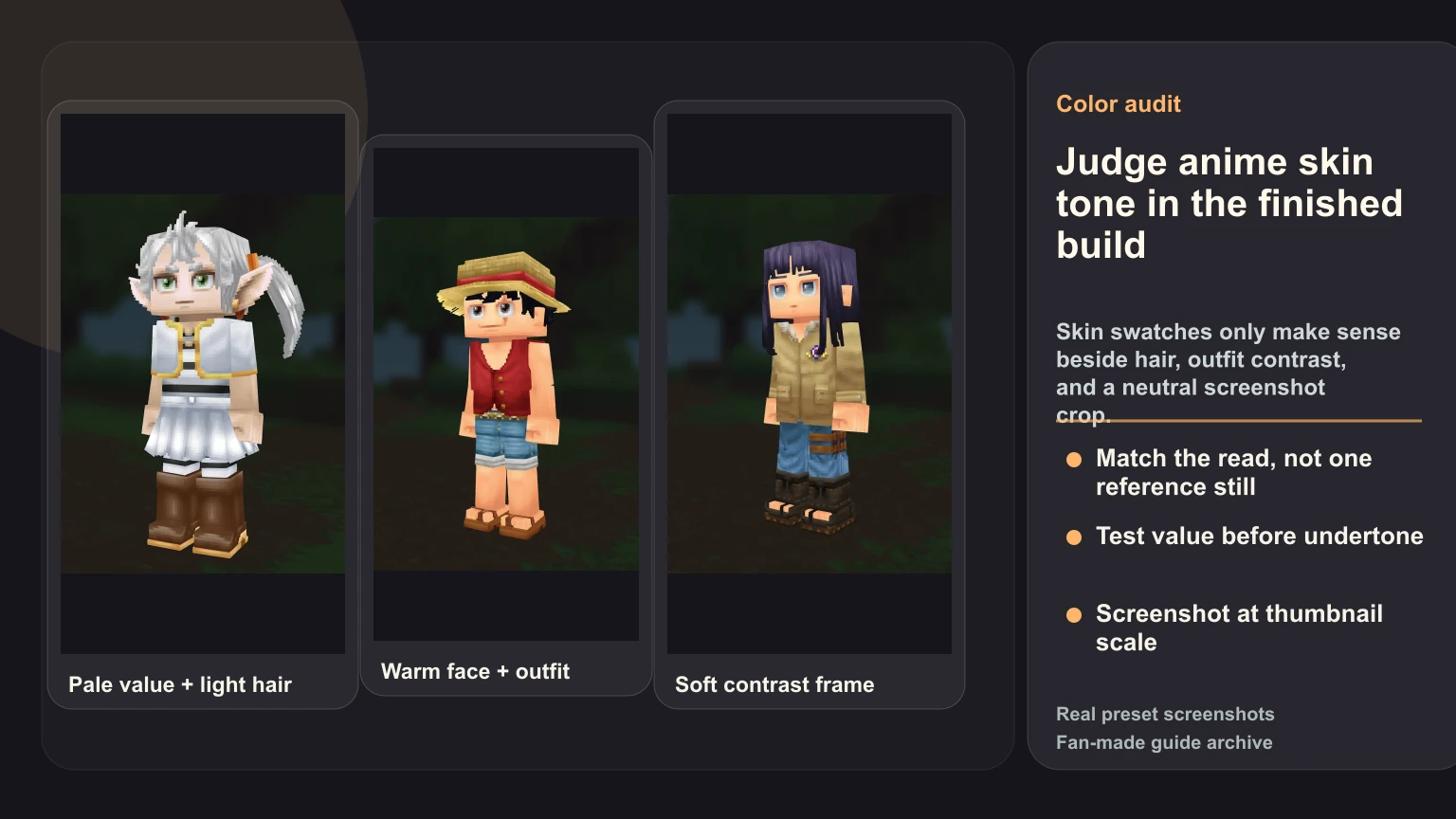
In a Frieren-style build, the skin tone has to survive beside pale hair and white cloth. If the face is too bright, everything merges. If it is too warm, the calm white-and-gold palette starts to feel wrong.
Temperature
Temperature means warm, cool, or neutral. Warm tones often work for energetic characters and outdoor palettes. Cool or neutral tones often work better for pale fantasy, black-uniform, or calm rival designs.
Do not overcorrect. If the outfit is already red, orange, or gold, a very warm face can make the whole build look noisy.
Saturation
Saturation is color intensity. Many weak Hytale recreations choose a skin tone that is technically close in hue but too intense next to the costume. The fix is often a quieter swatch, not a more literal one.
Judge skin beside hair first
Hair is one of the strongest identity carriers in Hytale. It also changes how skin tone is perceived.
A pale face can look darker beside white hair. A neutral face can look washed out beside very dark hair. A warm face can become too orange beside a red costume or straw-hat palette. That is why the working order should be:
- Choose the hair silhouette.
- Set the rough hair color.
- Choose a first-pass skin tone.
- Add the main torso colors.
- Review the face in a screenshot.
Do not finalize skin tone while the character is still missing hair and torso. The creator is a relationship system, not a swatch board.
Outfit contrast can make the correct tone look wrong
The same skin tone can feel right or wrong depending on the outfit. Luffy-style builds are a good example. A warm face can work beside a red vest and blue shorts, but only if the outfit is not so saturated that the face becomes a secondary red block.
Watch for these symptoms:
- A dark collar makes the face look too bright.
- A white top makes the face look too flat.
- A red or orange outfit makes the face look too warm.
- A cool outfit makes a peach tone feel disconnected.
- A saturated hair color makes the face look dull.
When this happens, do not immediately change the skin. First ask whether the torso color is doing too much work. Sometimes the right fix is quieter clothing, not a new face.
Test at the size players actually see
Hytale creator zoom can trick you. At close range, small undertone differences feel important. At normal viewing distance, silhouette, hair mass, and outfit contrast dominate.
Use a screenshot loop:
- Capture one neutral front or three-quarter image.
- Shrink it to roughly the size of a preset card.
- Compare it beside the reference at the same scale.
- Name the problem in plain language.
Useful diagnoses sound like this:
- "The face is too gray beside the hair."
- "The face is too warm for the cloak."
- "The skin disappears against white cloth."
- "The eyes and hair read, but the face has no presence."
Bad diagnoses sound like this:
- "It just feels off."
- "The color is not exact."
- "I need a perfect swatch."
The first group leads to a fix. The second group leads to random menu changes.
Use comparative testing, not perfection
For a public recipe, the goal is the best available Hytale recreation, not a perfect copy of the source art. A useful skin-tone review compares two or three options under the same hair and outfit.
Keep everything else still. Change only the face tone. Then ask:
- Which version preserves the character mood?
- Which version reads best at thumbnail size?
- Which version creates fewer problems with hair and outfit contrast?
- Which version would be easiest for another player to rebuild?
If one choice wins those questions, it belongs in the recipe. If none win cleanly, document the limitation. A known limitation is stronger than pretending the creator can do more than it can.
What to write in a recipe note
A good note does not need to be long. It should explain the target relationship.
Weak note:
- "Use the closest skin tone."
Better note:
- "Use a pale neutral skin tone that keeps the face visible beside white hair and light cloth. Avoid the warmest pale option because it fights the calm mage palette."
That second note helps even if Hytale later renames a color or adjusts a swatch. It tells the player what to preserve.
Common anime skin-tone fixes
Use these when a build is almost working:
- If the face disappears beside light hair, move one value step darker or reduce white clothing contrast.
- If the face feels too pink, test a more neutral swatch before changing hair.
- If a warm character looks too red, lower outfit saturation first.
- If a dark-haired character looks washed out, test a slightly warmer or darker face.
- If the screenshot looks good only in one crop, retest in a neutral angle.
These are small decisions, but they are the kind of decisions that separate a useful recipe from a thin settings list.
Why this makes the recipe more useful
Skin tone sounds like a narrow topic, but it often decides whether another player can reproduce the same visual balance. A bare settings list says "select this option" and stops. A useful recipe explains why the option works, what limitation remains, and how a player should judge alternatives.
That is the standard we want for HytaleCharacter.com: screenshot evidence, recipe JSON, creator path, source disclosure, known limitations, and manual recreation notes. The About page and Editorial Policy explain that scope in more detail.
If you want to practice the method, compare Frieren, Luffy, and Hyuga Hinata. Each one teaches a different skin-tone problem: pale value beside light hair, warm skin beside saturated clothing, and softer contrast under a darker hair frame.
For the full build order around this decision, read how to recreate characters in Hytale and common Hytale character creator mistakes.