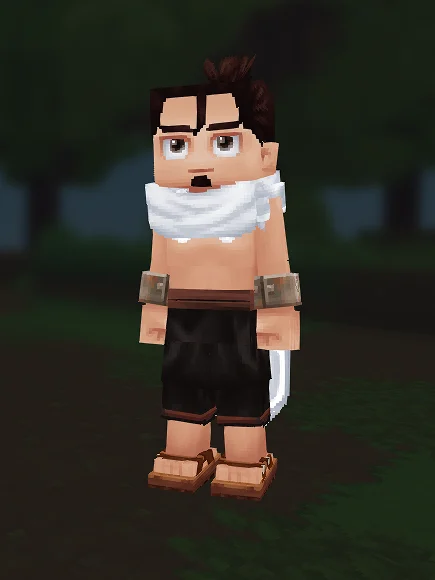
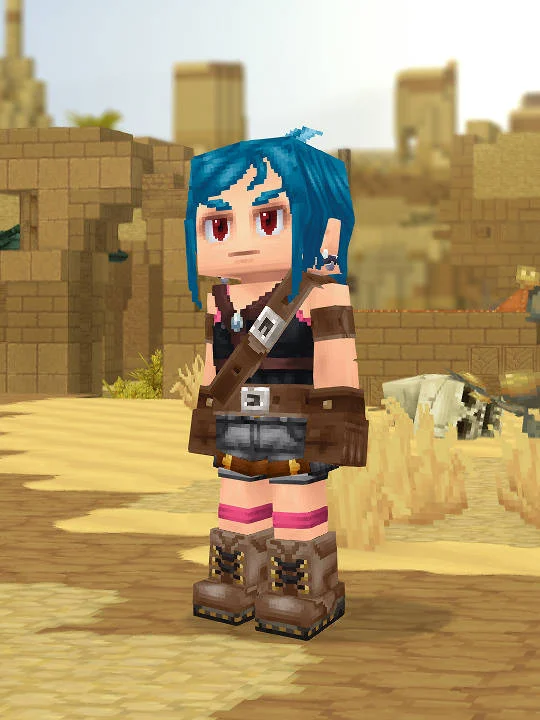
Tepeu is a fan-made Hytale recreation based on Majin and The Forsaken Kingdom; it is a manual creator reference, not an official skin download or an in-game import. The submitted screenshot establishes the visible target, while the JSON records 13 populated creator slots. The build is organized around the most readable in-game silhouette and gameplay-era styling. Its main anchors are haircut Samurai in Brown Darker, eyes Medium Eyes in Brown Dark, overtop Scarf Large in White, and pants Apprentice Pants in Black. Those are the settings to compare first when checking the full-body silhouette against the screenshot.
Begin with body characteristic Default in 15 and ears Default. Then complete the head in the same order used by the creator path: face Face Neutral, mouth Mouth Thin, haircut Samurai in Brown Darker, facial hair Soul Patch in Brown Darker, eyebrows Medium in Brown Darker, and eyes Medium Eyes in Brown Dark. Reading the settings in sequence matters because the haircut frames the face, the eyebrows and eyes establish the expression, and the mouth finishes the lower face. The submitted recipe leaves head accessory, face accessory, ear accessory, and skin feature unset, so do not add those pieces merely to fill every menu slot.
Build the clothing from the inside out using base layer Boxer in Black, pants Apprentice Pants in Black, overtop Scarf Large in White, and shoes Basic Sandals in Brown. This order keeps an outer garment from hiding an incorrect base layer and makes it easier to compare the color blocks in the player capture. Add gloves Shackles Feran in Rusty after the torso and legs are stable. The JSON leaves leg layer, undertop, and cape empty; those omissions are part of the submitted configuration rather than missing data.
For the cleanest recreation pass, set body and face first, confirm hair and eyes in a front view, assemble the torso, finish the recorded leg settings, and add any accessories last. Compare one section at a time under neutral light instead of changing several tokens after a single screenshot check. Hytale lighting can shift dark, warm, or saturated swatches, so preserve the recorded token before substituting a nearby color. If a future creator update renames a cosmetic, choose the closest available shape and color while keeping the JSON on this page as the historical reference.
This guide is limited to the submitted screenshot and recipe data. It does not claim a pixel-perfect match to every frame or version of Tepeu, and it does not reproduce source artwork, dialogue, or game files from Majin and The Forsaken Kingdom. Its practical value is the reproducible menu path: each populated token is shown in the step list, empty fields remain visibly empty, and the raw JSON is retained for verification. Readers can therefore rebuild the same fan interpretation, identify where Hytale lacks a one-to-one cosmetic, and make deliberate adjustments without losing the original recipe.