- Home
- /
- Game Character Presets
- /
- Zorro

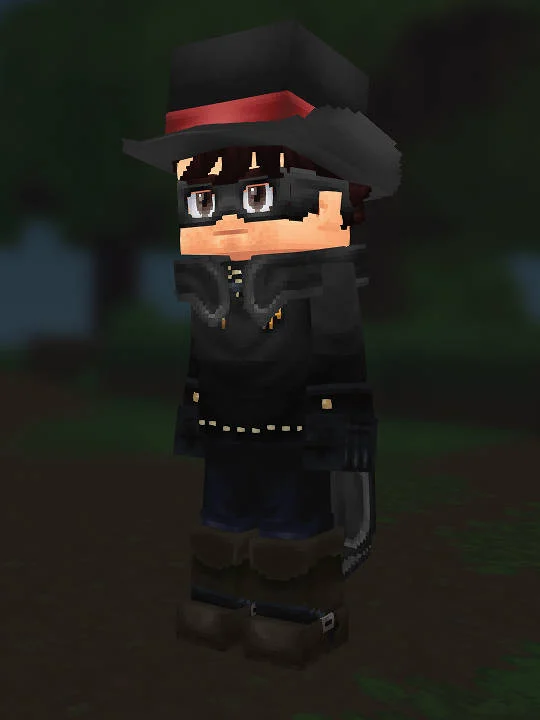
Zorro - Hytale Character Recipe
This Hytale skin recipe helps you recreate this character in the creator. Follow our step-by-step guide with exact settings for head, body, and outfit options. This build is based on The Mask of Zorro. Match the silhouette, core color palette, and standout accessories first, then refine the smaller details.
Step-by-step recreation
HEAD
Editor's notes
This build aims for the most recognizable The Mask of Zorro version of Zorro, not the most obscure alternate costume. In practice that means prioritizing the most readable in-game silhouette and gameplay-era styling, because Hytale reads broad shapes and clean contrast better than tiny decorative details. The goal is that players can identify the character quickly from the front and from a slight distance, even before they inspect every option in the creator.
The outfit choices were picked to preserve that first-read silhouette. We favor pieces that match the source costume before chasing tiny cosmetic details, so the torso, legs, and accessory combination communicates the right era or role immediately. If the source material has several nearby variants, this recipe leans toward the version most fans would call the default look for Zorro. That keeps the recreation stable when you compare screenshots, submit revisions, or share the preset with other Hytale players.
Hair, face, and color decisions are doing the second layer of accuracy. Here the priority is that hair, face, and accessory choices need to echo the original game model first. If a cosmetic is not a perfect one-to-one match, the recipe intentionally chooses the option that preserves expression, silhouette, and skin-tone balance rather than chasing a weaker literal match. The same logic applies to color picks: saturation and contrast are tuned for how Hytale renders them in-game, not just how they appear in a reference still.