Back to recipes
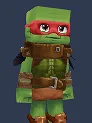
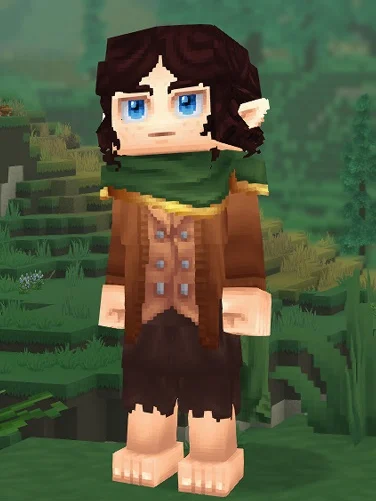
TMNT Hytale avatar preview
MoviesTeenage Mutant Ninja Turtle

TMNT Hytale Character Recipe

Recreate TMNT in Hytale with this movie-inspired character recipe inspired by Teenage Mutant Ninja Turtle. Follow the exact outfit, hair, color, and avatar.

38
Views
Saves
Noindex
SEO status
Manual recreation only

This page is a reference guide. It does not import, install, replace, or modify Hytale files.

Step-by-step creator path

Head

Eyes
Medium
BrownDark
Medium_Eyes.BrownDark
Face Accessory
Bandit Mask
RedVariant: Default
BanditMask.Red.Default

General

Underwear
Boxer
Brown
Boxer.Brown
Body Characteristics
Muscular
Skin tone 35
Muscular.35
Face
Makeup - Aged
Face_MakeUp_Older
Mouth
Large Mouth
Mouth_Long
Ears
Default
Default

Torso

Overtop
Featherbound Tunic
PitchBlack
Featherbound_Tunic.PitchBlack
Gloves
Metal Bracelets
Brown
Straps_Leather.Brown

Legs

Overpants
Kneepads
Copper_Green
KneePads.Copper_Green
Shoes
Thick Sandals
Brown
ThickSandals.Brown

Design notes

This build aims for the most recognizable Teenage Mutant Ninja Turtle version of TMNT, not the most obscure alternate costume. In practice that means prioritizing the most iconic on-screen silhouette and costume language, because Hytale reads broad shapes and clean contrast better than tiny decorative details. The goal is that players can identify the character quickly from the front and from a slight distance, even before they inspect every option in the creator.

The outfit choices were picked to preserve that first-read silhouette. We favor the outfit has to communicate the role immediately, even from mid-distance, so the torso, legs, and accessory combination communicates the right era or role immediately. If the source material has several nearby variants, this recipe leans toward the version most fans would call the default look for TMNT. That keeps the recreation stable when you compare screenshots, submit revisions, or share the preset with other Hytale players.

Hair, face, and color decisions are doing the second layer of accuracy. Here the priority is that hair shape, facial framing, and accent colors are what sell the character fastest. If a cosmetic is not a perfect one-to-one match, the recipe intentionally chooses the option that preserves expression, silhouette, and skin-tone balance rather than chasing a weaker literal match. The same logic applies to color picks: saturation and contrast are tuned for how Hytale renders them in-game, not just how they appear in a reference still.

If Hytale updates a cosmetic, renames a menu item, or shifts a color swatch, keep the silhouette first. Match the closest torso layer, keep the same light-versus-dark balance, and then tune hair, face, and skin-tone until the character reads correctly again. When in doubt, preserve the overall impression of TMNT before chasing minor details. That approach makes this recipe resilient to creator changes and easier to iterate into your own variation.

Review basis

Fan-made recreation inspired by Teenage Mutant Ninja Turtle. Screenshots and recipe data are preserved as reference material for manual creator matching.

Last content update: 7/14/2026

Recipe JSON

{
  "bodyCharacteristic": "Muscular.35",
  "underwear": "Boxer.Brown",
  "face": "Face_MakeUp_Older",
  "ears": "Default",
  "mouth": "Mouth_Long",
  "haircut": null,
  "facialHair": null,
  "eyebrows": null,
  "eyes": "Medium_Eyes.BrownDark",
  "pants": null,
  "overpants": "KneePads.Copper_Green",
  "undertop": null,
  "overtop": "Featherbound_Tunic.PitchBlack",
  "shoes": "ThickSandals.Brown",
  "headAccessory": null,
  "faceAccessory": "BanditMask.Red.Default",
  "earAccessory": null,
  "skinFeature": null,
  "gloves": "Straps_Leather.Brown",
  "cape": null
}
More recipes